Product / Costs
Know what every asset really costs you.
Solmex posts the cost of parts and fuel to the asset that used them as the work is recorded, so each asset shows its cost this month, this year and over its life.
Try the Business plan free for 14 days. No card needed.

Key points
- Parts and fuel cost post to the asset automatically the moment the work is recorded, nothing typed twice.
- Every asset shows its cost this month, this year and over its life, with the average per month.
- Every cost row names what created it, and a wrong entry is voided with a reason, never deleted.
The problem
Most sites cannot say what an asset costs.
Costs sit in five places
Fuel is in one spreadsheet, parts in the store book, outside repairs in accounting. Nobody adds them up per asset.
Month end is manual work
Someone spends two days copying fuel slips and parts issues into a report. By the time it is ready, the numbers are already old.
Repair or replace is a guess
An old compressor keeps breaking. Without its full cost on record, the decision to replace it rests on opinion.
How it works
Cost follows the work, automatically.
Parts and fuel cost post themselves
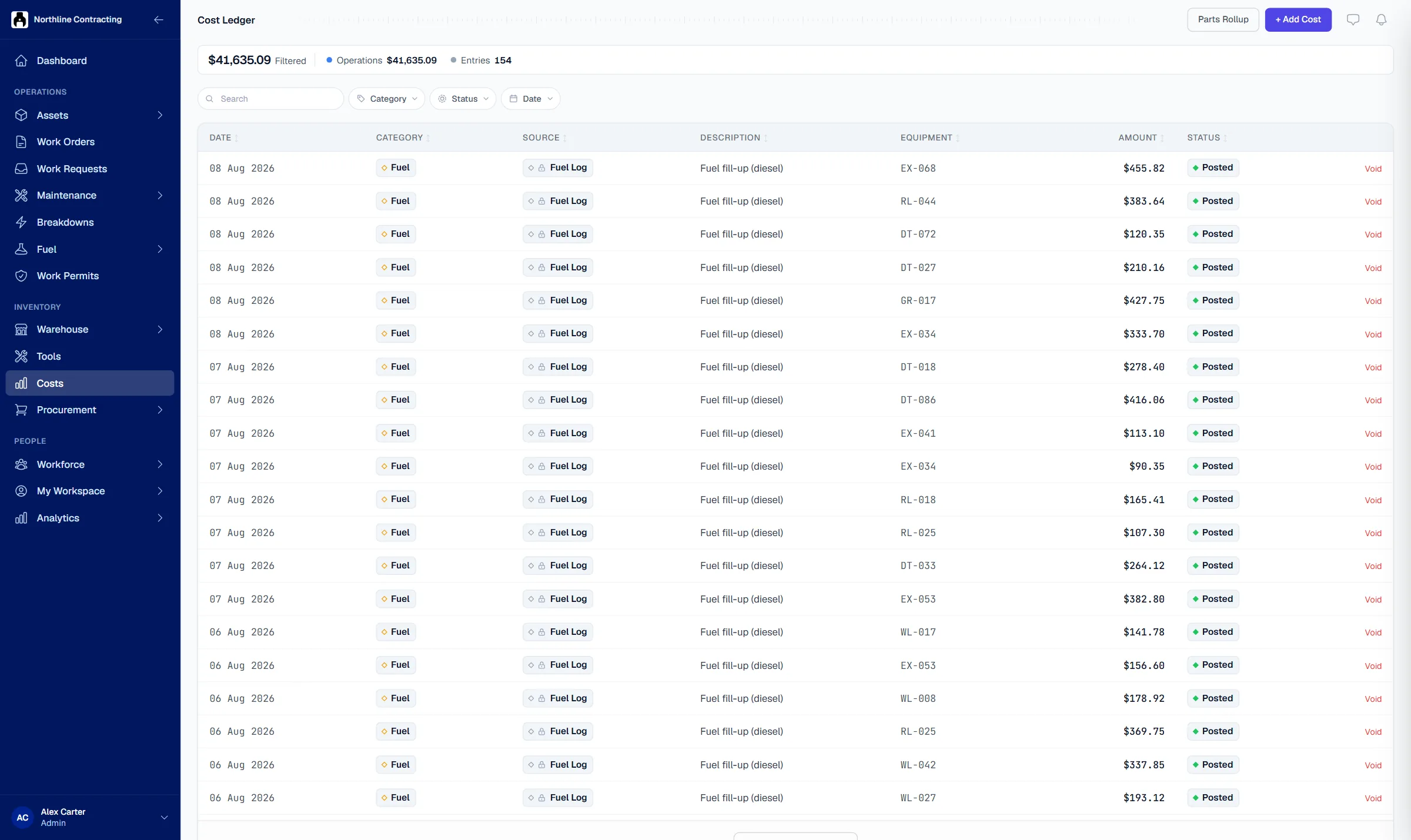
When a part is issued or a fill-up is logged, its cost goes to the asset and the work order at once. Labour, rental and outside repairs are added by hand in the same ledger.
- Nothing typed twice
- Parts at their real stock cost
- Categories for every kind of cost

The full cost of each asset
Open any asset to see its cost over its life, this year, this month and the last 30 days, with the average per month and a split by category. The repair or replace discussion starts from facts.
- Cost by category on every asset
- Filter by location or work order
- Export to Excel for finance

Every figure traces to its source
Each row names what created it: a fill-up, a stock issue or a person. A wrong entry is voided with a reason and kept, never deleted, and every change shows on the entry's history.
- Void with a reason, never delete
- History of every change
- Automatic rows cannot be edited by hand

Questions
Frequently asked questions
Where do the cost figures come from?
What happens if a cost is entered wrongly?
Can we see costs in our own currency?
Which plan includes costs?
See the true cost of your assets this month.
Try the Business plan free for 14 days, with no card. After that, one user and up to 25 assets stay free for as long as you like.