Product / Breakdowns
Get broken assets running again, faster.
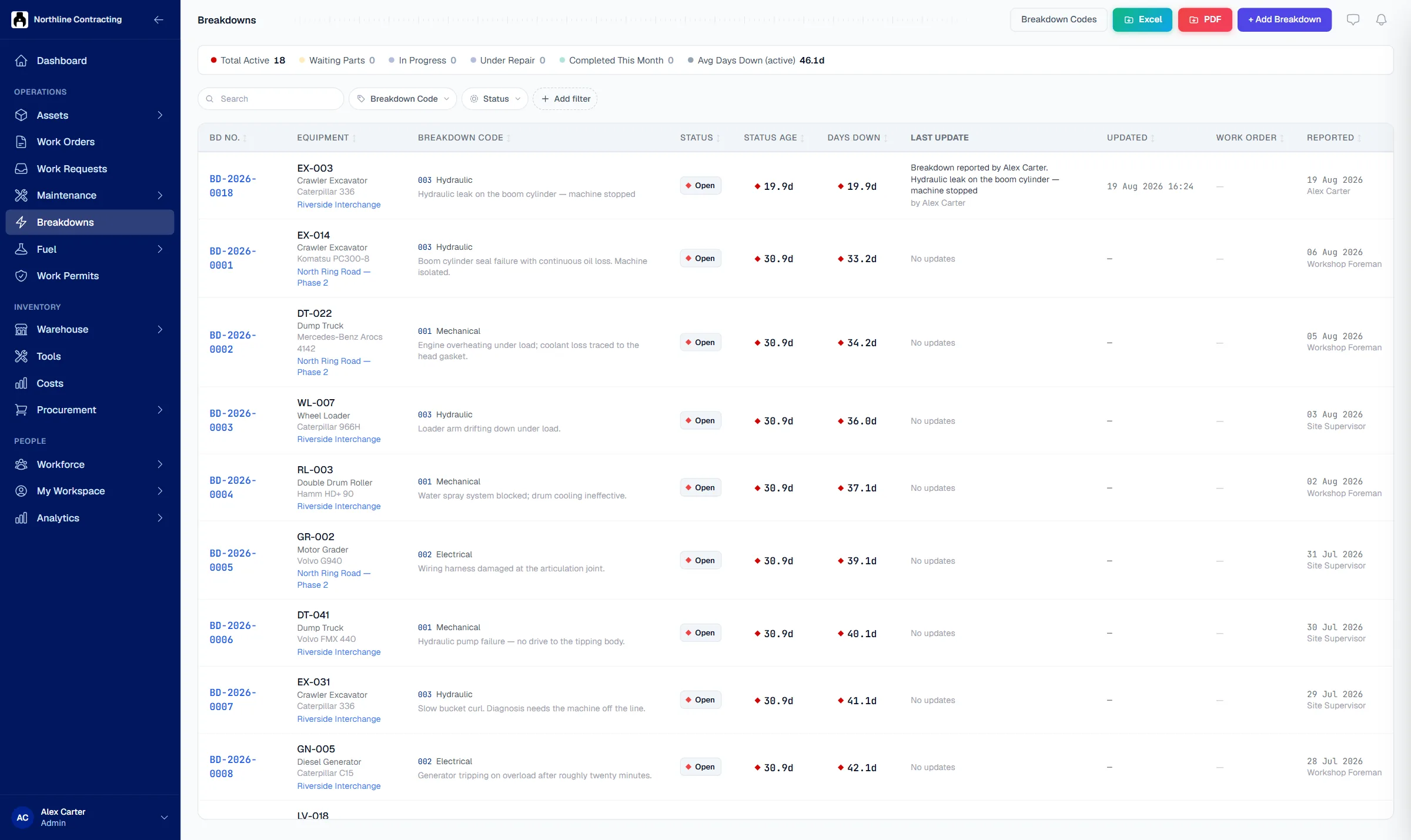
Solmex records each breakdown the moment it is reported, counts the downtime, and shows which assets fail most and why, so repeat faults stop being a surprise.
Try the Business plan free for 14 days. No card needed.

Key points
- Downtime starts counting the moment a fault is reported, not when someone gets around to logging it.
- Failure codes come from a tree you control, so causes can be compared across the fleet, not just described in free text.
- Breakdown analysis ranks the assets that fail most and repeat within 30 days, printable as a scheduled report.
The problem
Downtime you cannot measure, you cannot reduce.
Nobody knows how long it was down
A generator was down for four days, but the report says one. The start time was never written down, so the number is a guess.
The same fault keeps coming back
Pump P-12 has had the same seal failure three times this year. Each repair was treated as new, so the cause was never fixed.
Management asks and nobody can answer
The plant manager wants to know what is down, since when and when it will be back. Someone spends the morning making calls.
How it works
From the first report to the reason it failed.
Downtime starts when the fault is reported
A breakdown is logged from a phone with a photo, or raised from a QR code request. The asset is marked down at once, and the clock runs until the repair is recorded.
- Reported from a phone with a photo
- Asset status changes automatically
- Opens a work order in one step

Failure codes in your own words
Classify each breakdown with a failure code from a tree you control, from system down to component. A breakdown logged by mistake is cancelled with a reason, so it never counts as a real failure.
- A default code tree you can edit
- Reclassify after diagnosis
- Mistakes cancelled, not faked as repairs

See which assets fail most, and why
Breakdown analysis shows availability, time between failures, time to repair, the top causes and the assets that fail again within 30 days. A status report can be printed or emailed to management on a schedule.
- MTBF and MTTR per asset
- Top causes and repeat failures
- Scheduled PDF report by email

Questions
Frequently asked questions
How is downtime measured?
What if a breakdown was logged by mistake?
Can we use our own failure categories?
Is there a report for management?
Which plan includes breakdowns?
Start recording breakdowns properly today.
Try the Business plan free for 14 days, with no card. After that, one user and up to 25 assets stay free for as long as you like.