Product / Tools
Know who has every tool, right now.
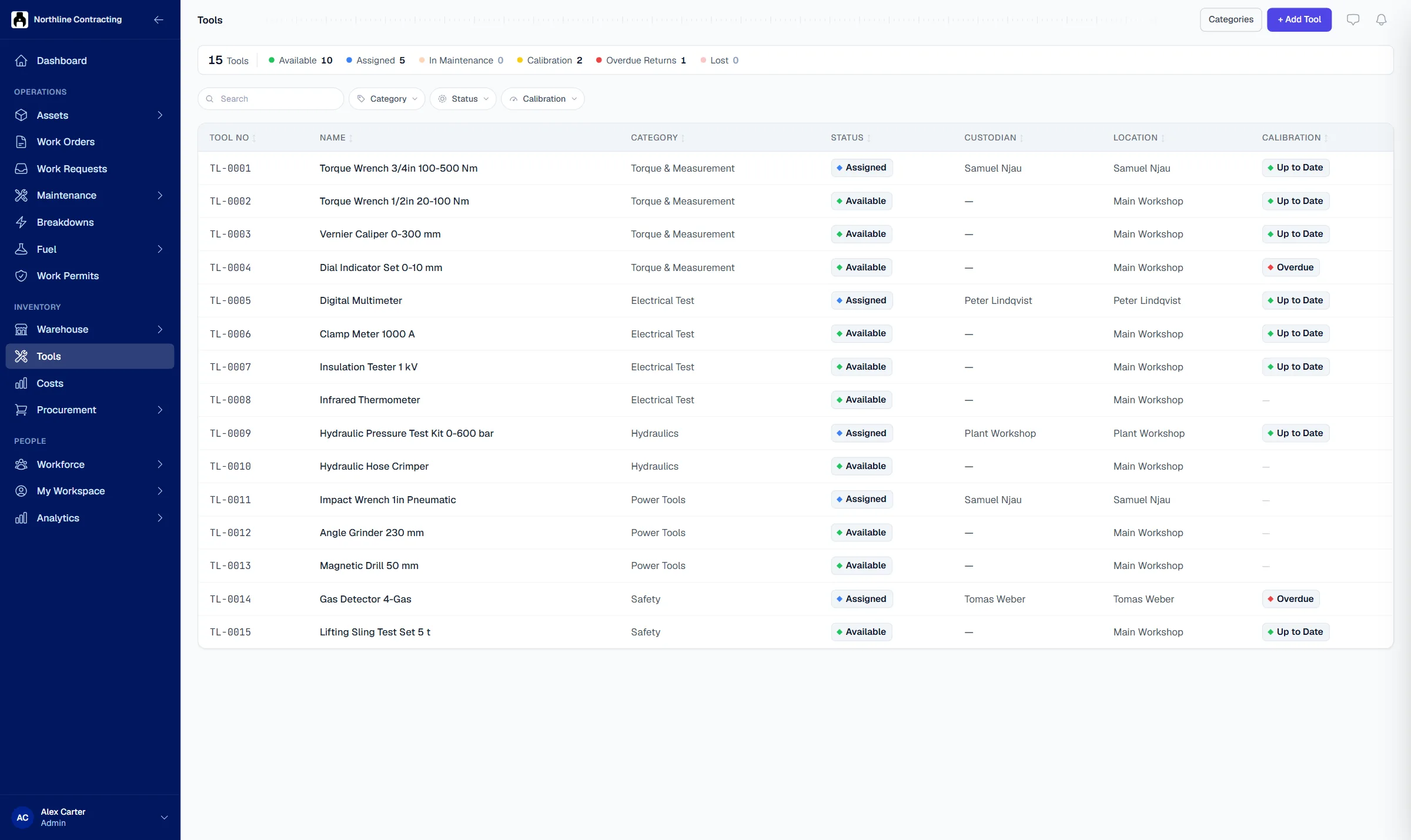
Solmex signs each tool out to one person, team or location, records when it comes back, and shows which tools are overdue for return or calibration.
Try the Business plan free for 14 days. No card needed.

Key points
- One tool, one holder at a time; it cannot be assigned to someone else until it is recorded back.
- Calibration due dates are entered once and tracked automatically: current, due within 30 days, or overdue.
- A QR label on every tool opens its full record from a phone scan: what it is, who holds it, when it is due.
The problem
Tools go missing when nobody signs for them.
Nobody knows who has it
A technician needs the torque wrench for a job. It left the store last week and the notebook says nothing about who took it.
Lost tools are bought twice
Test pumps, meters and cordless tools disappear one by one. The replacements show up in the budget, never in a report.
Expired calibration goes unnoticed
A gauge used on a pressure test has an expired certificate. Nobody checked the date because it lived in a spreadsheet.
How it works
Every tool on the shelf or signed to a name.
One holder per tool, always
Sign a tool out to a person, a team or a location, with an expected return date. A tool that is out cannot be assigned again until it comes back.
- Assign to a person, team or location
- Overdue returns listed by name
- Full history of every hand-off

Calibration dates that check themselves
Enter the calibration due date once. Solmex shows each tool as current, due within 30 days or overdue, so an expired gauge is visible before anyone uses it.
- Status worked out from the date
- Filter tools due or overdue
- Only tools that need it are tracked

A QR label on every tool
Print a QR label for each tool. A scan from a phone opens its record: what it is, who holds it and when its calibration is due.
- Labels printed from Solmex
- Opens from any phone browser
- Tool numbers from TL-0001 up

Questions
Frequently asked questions
What problem does a tool register solve?
Does Solmex track calibration?
Is a tool the same thing as an asset?
Which plan includes tool tracking?
Put your tool store on Solmex this week.
Try the Business plan free for 14 days, with no card. After that, one user and up to 25 assets stay free for as long as you like.