Product / Work Orders
Every job assigned, done and signed off.
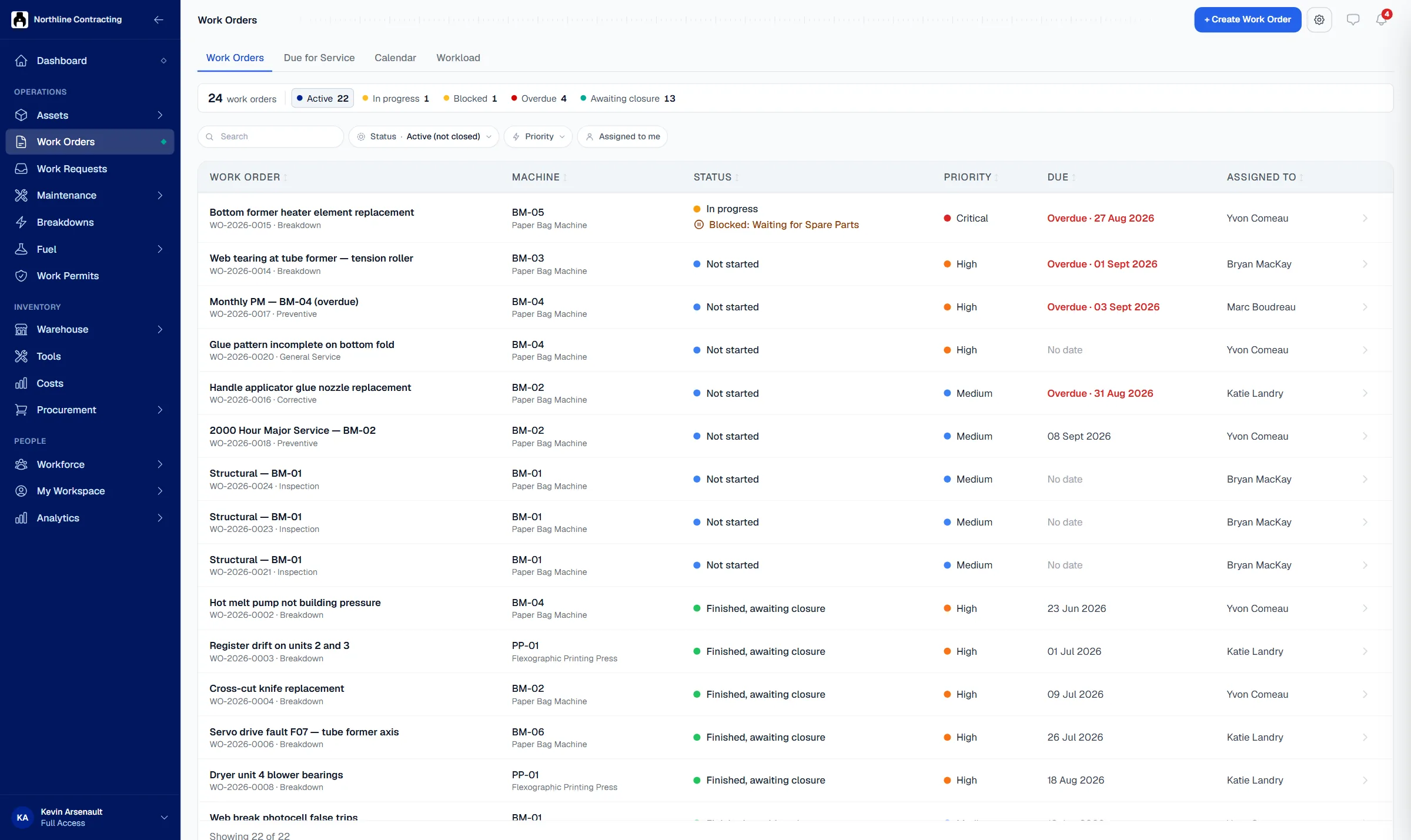
Solmex turns each job into a work order with a priority, a person and a date. The technician records the work and parts used, and the right people sign it off.
Try the Business plan free for 14 days. No card needed.

Key points
- A work order can be raised from a breakdown, a request or a failed inspection, not just typed from scratch.
- A stuck job is marked blocked with a reason in one button, so nothing silently goes quiet.
- Which roles must sign off a job is your own choice, and the record stays on the asset's history after it closes.
The problem
Jobs get lost between the call and the fix.
Nobody owns the job
A fault is mentioned on the radio, two technicians assume the other has it, and the machine stays down until someone asks again.
Paper job sheets disappear
The job card is filled in by hand, left in a van and typed up days later, if at all. The parts used are never recorded.
No one knows what is waiting
A job has been stuck for a week waiting for a part or a permit, and the manager only finds out when production complains.
How it works
From the first report to the signed record.
One owner, one date, one priority
Create a work order from a breakdown, a request, a failed inspection or by hand. Give it a priority, a person and a date, and it appears on their list.
- Priority from low to critical
- Linked to the asset and its source
- Calendar and workload views

What was done, with which parts
The technician records the work done and the parts used from a phone at the asset. If the job is stuck, one button marks it blocked and says why.
- Work done recorded from a phone
- Parts issued against the job
- Blocked jobs show the reason

Signed off by the right people
You decide which roles sign a job, such as technician, supervisor or engineer, and which signatures are required. The work order closes with its record complete and stays on the asset's history.
- Your own sign-off roles
- Required signatures before closing
- Printable work order sheet

Questions
Frequently asked questions
What is the difference between a work order and a work request?
Can technicians close work orders from a phone?
Where do work orders come from?
Who signs off a completed job?
Which plan includes work orders?
Open your first work order in five minutes.
Try the Business plan free for 14 days, with no card. After that, one user and up to 25 assets stay free for as long as you like.